> ## Documentation Index
> Fetch the complete documentation index at: https://docs.shareofmodel.ai/llms.txt
> Use this file to discover all available pages before exploring further.
# Google Ads PMax Integration
> How Share Of Model brand-perception signals become high-value Search Themes inside Google Ads Performance Max campaigns — methodology, data usage, and client controls.
The Share Of Model **PMax Optimizer** connects two traditionally separate worlds: AI-driven brand-perception intelligence and paid-media execution. It translates the semantic signals that Large Language Models (LLMs) use to describe, evaluate, and recommend brands into high-value **Search Themes** that are injected directly into **Google Ads Performance Max (PMax)** campaigns.
For paid-media managers, this means moving beyond backward-looking keyword strategies built on historical query data. Campaigns are enriched with themes grounded in how consumers think and talk about a brand today — as shaped by the AI systems they increasingly rely on to guide purchase decisions.
 ## Why it matters now
Search behaviour is undergoing its most significant structural shift since the emergence of mobile. LLMs now act as trusted intermediaries in the consumer journey — shaping what people search for, what they buy, and how they evaluate competing brands before they ever reach a results page.
Traditional keyword strategies are built on what people *have* searched, not on how AI systems *perceive and present* brands. Valuable opportunities — rooted in AI-influenced semantic associations — go undetected. The PMax Optimizer was built to close that gap.
**60% of annual search revenue is projected to come from AI platforms by 2029.**
Source: Semrush — *The AI Search Revolution Report*.
AI models elevate certain source types and semantic themes. Paid, SEO, and PR strategies must prioritise the concepts LLMs actually use as evidence when answering consumer queries.
Brand narratives are increasingly co-written by AI. Brands must actively shape the semantic associations that drive AI answers — and align their paid campaigns accordingly.
The attributes and benefits AI models emphasise become the most valuable themes to highlight in campaign targeting and creative.
## Key concepts
The integration works with three core Google Ads concepts.
Google's most automated campaign type. It reaches users across all Google properties — Search, YouTube, Display, Discover, Gmail, and Maps — from a single campaign. Advertisers provide creative assets and goals; Google's AI handles bidding, targeting, and ad assembly.
Because PMax relies heavily on automation, the quality of the inputs you provide — especially **Search Themes** and **Audience Signals** — has a disproportionate impact on how quickly the campaign learns and how effectively it targets high-intent users.
The foundational building block of a PMax campaign, containing all the creative elements Google uses to assemble ads: headlines, descriptions, images, videos, logos, and URLs. Each Asset Group typically represents a distinct product line, audience segment, or creative angle.
The semantic content of an Asset Group defines the territory the campaign can credibly address. If a high-value theme is absent from an Asset Group, PMax cannot effectively target users searching for it.
Intent signals you provide to guide PMax toward relevant queries. They are *additive* to PMax's automated matching — they do not restrict targeting, but steer Google's AI toward user intents that might otherwise be underweighted in early learning.
Well-chosen Search Themes accelerate the learning phase, improve match quality, and surface high-purchase-intent users more efficiently. Each Asset Group supports up to **25 Search Themes**, making their selection and quality a significant performance lever.
Search Themes are not keywords in the traditional sense — they represent semantic *intent territories*. A theme like "natural skincare for sensitive skin" signals a whole cluster of related queries and user contexts, giving PMax richer guidance than a single keyword ever could.
## Prerequisites
* An active Share Of Model analysis for the brand(s) to be optimised — this provides the perception data that powers the algorithm.
* At least **Editor** role at the organization or workspace level on Share Of Model.
* A Google Ads account with **Standard access** connected to the relevant workspace.
* Active PMax campaigns with at least one Asset Group configured.
* A category with sufficient query volume for Keyword Planner validation to be meaningful.
## How it works
The engagement follows a structured four-step methodology — the operational layer that turns Share Of Model intelligence into live campaign performance.
A structured interrogation of the semantic associations AI systems hold about the brand across ChatGPT, Gemini, Perplexity, and others. It covers strengths and weaknesses (with sentiment scoring), competitor differentiation, persona-level insights, and category-level themes. The output is a perception brief that feeds gap detection.
All active Asset Groups are ingested and analysed for semantic coverage: existing Search Themes, headline and description content, visual-asset alignment, and narrative consistency. The result is a coverage map showing exactly which perception-backed themes are not yet represented.
The perception brief and coverage map are compared to produce a prioritised list of gaps — themes strongly present in LLM brand descriptions but absent from the campaign. Gaps are ranked by LLM-signal strength, competitive-differentiation potential, commercial relevance, and persona alignment, and shared with your team for full transparency.
Validated themes are mapped to the most relevant Asset Group and pushed via the Google Ads API — no manual entry. Only volume-validated themes are included, every theme passes an analyst review step, and (where the Smart Audience module is active) AI-derived personas can be mapped to Google Audience Signals alongside the Search Themes.
Performance impact is typically measurable within the first two to four weeks after injection, with campaigns reaching optimised performance faster than those without LLM-backed signals.
## Data inputs
The algorithm works with three categories of input. Their quality and completeness directly influence the relevance and performance potential of the output Search Themes.
How LLMs perceive and describe your brand across its category:
* **Brand strengths and weaknesses** — attributes and associations LLMs consistently link to the brand, with sentiment scores where available.
* **Persona-level insights** — for each persona, the motivations, objections, expected benefits, and decision criteria LLMs surface.
* **Competitor positioning** — how competing brands are characterised by AI models, enabling differentiation signals.
* **Topic associations** — thematic clusters (durability, sustainability, price-value, ingredient quality) LLMs connect to the brand and category.
The content of your existing PMax Asset Groups:
* **Search Themes currently in use** — to understand which intent territories are already covered.
* **Headlines and descriptions** — text analysed for semantic coverage and alignment with brand-perception data.
* **Image and video assets** — visual content is semantically analysed, not just tagged, to assess creative alignment with key brand attributes.
* **URLs and landing-page signals** — used to assess consistency between campaign messaging and the destination experience.
Any brand-specific constraints — restricted terminology, required messaging angles, excluded competitor references — are incorporated as guardrails throughout generation and filtering. This ensures every output theme is compliant with your brand standards *before* it reaches an analyst for review.
## Inside the algorithm
Behind the four-step methodology, the three input sources flow through a five-stage pipeline. Each stage progressively increases the strategic quality and real-world performance potential of the resulting Search Themes.
The algorithm compares the semantic content of your Share Of Model analysis against the themes present in your active Asset Groups, producing a map of **semantic gaps** — high-signal topics consumers and AI models associate with your brand but that are absent or underrepresented. Gaps are categorised as brand-strength, category-intent, and persona-intent gaps.
Using the gaps as a brief, a grounded generative model (Gemini) produces candidate Search Themes, guided by your category context, perception and persona signals, existing Asset Group content, and brand-policy guardrails. Themes are generated as intent-rich concepts ("vegan moisturiser for dry sensitive skin") rather than generic keywords, and diversified across intent types, persona perspectives, and specificity levels.
Each candidate is validated against real-world demand using the Google Keyword Planner API. Themes below a minimum monthly search-volume threshold are discarded, so only themes with proven audience demand are retained. This prevents the common failure mode of AI-generated lists: coherent themes that no one actually searches for.
Volume-validated themes are embedded as vectors that capture their meaning. The algorithm removes themes too similar to existing Search Themes (deduplication), prunes themes too similar to one another (diversification), and scores those that add genuinely new semantic coverage. A configurable similarity threshold controls how aggressively near-duplicates are removed.
Remaining candidates enter a multi-round scoring loop (typically 10+ iterations), evaluated on **intent clarity**, **query resonance**, **PMax impact potential**, and **strategic alignment**. Themes that score consistently well across all four dimensions are retained. The pipeline outputs up to **25 high-scoring Search Themes per Asset Group**, each with a full rationale.
## Recommendation transparency
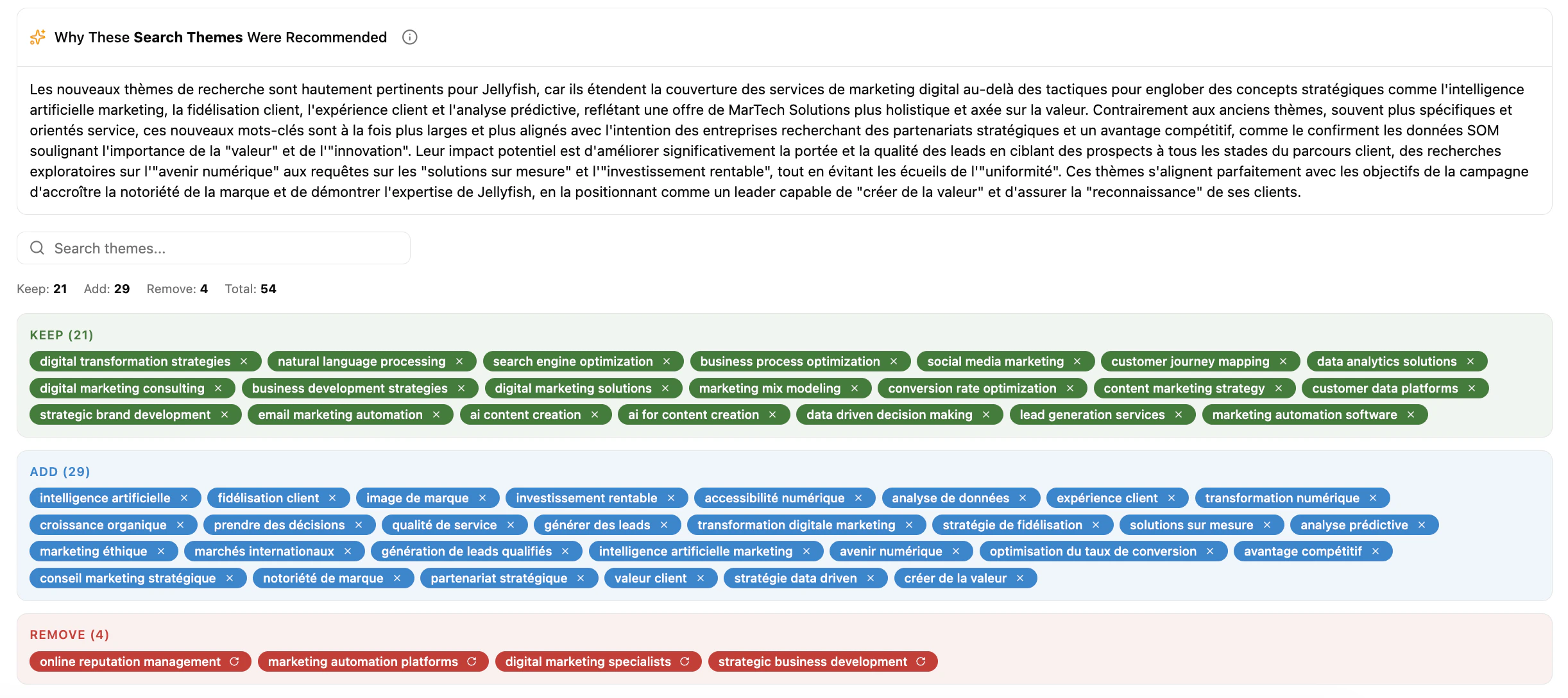
Every recommendation is explainable. Unlike black-box suggestion tools, each Search Theme comes with a structured, plain-language explanation — surfaced in the platform UI and available via API — so analysts have full visibility into the reasoning. Each explanation is capped at 150 words and structured around three components:
How the theme relates to your existing campaign structure — what themes are already present, and why this one is additive rather than redundant.
Which specific brand strengths, weaknesses, or perception signals (with sentiment scores where relevant) make this theme strategically valuable now.
A clear statement of the gap the theme addresses — where current search terms fall short, and how this theme fills the coverage void.
**Example explanation** — LLMs, including Gemini, consistently identify "social impact" as a core strength of your brand, with positive sentiment across ChatGPT and Perplexity. However, your current Asset Group search terms include no themes related to social impact or sustainability credentials. Incorporating Search Themes in this area aligns your campaign with the perception signals AI models amplify most strongly, and addresses a clear semantic gap in your current targeting.
Before any theme reaches a live account, it passes through an **analyst review step** showing the recommended theme, its explanation, the estimated monthly search volume, and the Asset Group it maps to. Analysts can approve themes individually, bulk-approve all recommendations for an Asset Group, or exclude specific themes — ensuring human oversight with full transparency at every step.
## Why it matters now
Search behaviour is undergoing its most significant structural shift since the emergence of mobile. LLMs now act as trusted intermediaries in the consumer journey — shaping what people search for, what they buy, and how they evaluate competing brands before they ever reach a results page.
Traditional keyword strategies are built on what people *have* searched, not on how AI systems *perceive and present* brands. Valuable opportunities — rooted in AI-influenced semantic associations — go undetected. The PMax Optimizer was built to close that gap.
**60% of annual search revenue is projected to come from AI platforms by 2029.**
Source: Semrush — *The AI Search Revolution Report*.
AI models elevate certain source types and semantic themes. Paid, SEO, and PR strategies must prioritise the concepts LLMs actually use as evidence when answering consumer queries.
Brand narratives are increasingly co-written by AI. Brands must actively shape the semantic associations that drive AI answers — and align their paid campaigns accordingly.
The attributes and benefits AI models emphasise become the most valuable themes to highlight in campaign targeting and creative.
## Key concepts
The integration works with three core Google Ads concepts.
Google's most automated campaign type. It reaches users across all Google properties — Search, YouTube, Display, Discover, Gmail, and Maps — from a single campaign. Advertisers provide creative assets and goals; Google's AI handles bidding, targeting, and ad assembly.
Because PMax relies heavily on automation, the quality of the inputs you provide — especially **Search Themes** and **Audience Signals** — has a disproportionate impact on how quickly the campaign learns and how effectively it targets high-intent users.
The foundational building block of a PMax campaign, containing all the creative elements Google uses to assemble ads: headlines, descriptions, images, videos, logos, and URLs. Each Asset Group typically represents a distinct product line, audience segment, or creative angle.
The semantic content of an Asset Group defines the territory the campaign can credibly address. If a high-value theme is absent from an Asset Group, PMax cannot effectively target users searching for it.
Intent signals you provide to guide PMax toward relevant queries. They are *additive* to PMax's automated matching — they do not restrict targeting, but steer Google's AI toward user intents that might otherwise be underweighted in early learning.
Well-chosen Search Themes accelerate the learning phase, improve match quality, and surface high-purchase-intent users more efficiently. Each Asset Group supports up to **25 Search Themes**, making their selection and quality a significant performance lever.
Search Themes are not keywords in the traditional sense — they represent semantic *intent territories*. A theme like "natural skincare for sensitive skin" signals a whole cluster of related queries and user contexts, giving PMax richer guidance than a single keyword ever could.
## Prerequisites
* An active Share Of Model analysis for the brand(s) to be optimised — this provides the perception data that powers the algorithm.
* At least **Editor** role at the organization or workspace level on Share Of Model.
* A Google Ads account with **Standard access** connected to the relevant workspace.
* Active PMax campaigns with at least one Asset Group configured.
* A category with sufficient query volume for Keyword Planner validation to be meaningful.
## How it works
The engagement follows a structured four-step methodology — the operational layer that turns Share Of Model intelligence into live campaign performance.
A structured interrogation of the semantic associations AI systems hold about the brand across ChatGPT, Gemini, Perplexity, and others. It covers strengths and weaknesses (with sentiment scoring), competitor differentiation, persona-level insights, and category-level themes. The output is a perception brief that feeds gap detection.
All active Asset Groups are ingested and analysed for semantic coverage: existing Search Themes, headline and description content, visual-asset alignment, and narrative consistency. The result is a coverage map showing exactly which perception-backed themes are not yet represented.
The perception brief and coverage map are compared to produce a prioritised list of gaps — themes strongly present in LLM brand descriptions but absent from the campaign. Gaps are ranked by LLM-signal strength, competitive-differentiation potential, commercial relevance, and persona alignment, and shared with your team for full transparency.
Validated themes are mapped to the most relevant Asset Group and pushed via the Google Ads API — no manual entry. Only volume-validated themes are included, every theme passes an analyst review step, and (where the Smart Audience module is active) AI-derived personas can be mapped to Google Audience Signals alongside the Search Themes.
Performance impact is typically measurable within the first two to four weeks after injection, with campaigns reaching optimised performance faster than those without LLM-backed signals.
## Data inputs
The algorithm works with three categories of input. Their quality and completeness directly influence the relevance and performance potential of the output Search Themes.
How LLMs perceive and describe your brand across its category:
* **Brand strengths and weaknesses** — attributes and associations LLMs consistently link to the brand, with sentiment scores where available.
* **Persona-level insights** — for each persona, the motivations, objections, expected benefits, and decision criteria LLMs surface.
* **Competitor positioning** — how competing brands are characterised by AI models, enabling differentiation signals.
* **Topic associations** — thematic clusters (durability, sustainability, price-value, ingredient quality) LLMs connect to the brand and category.
The content of your existing PMax Asset Groups:
* **Search Themes currently in use** — to understand which intent territories are already covered.
* **Headlines and descriptions** — text analysed for semantic coverage and alignment with brand-perception data.
* **Image and video assets** — visual content is semantically analysed, not just tagged, to assess creative alignment with key brand attributes.
* **URLs and landing-page signals** — used to assess consistency between campaign messaging and the destination experience.
Any brand-specific constraints — restricted terminology, required messaging angles, excluded competitor references — are incorporated as guardrails throughout generation and filtering. This ensures every output theme is compliant with your brand standards *before* it reaches an analyst for review.
## Inside the algorithm
Behind the four-step methodology, the three input sources flow through a five-stage pipeline. Each stage progressively increases the strategic quality and real-world performance potential of the resulting Search Themes.
The algorithm compares the semantic content of your Share Of Model analysis against the themes present in your active Asset Groups, producing a map of **semantic gaps** — high-signal topics consumers and AI models associate with your brand but that are absent or underrepresented. Gaps are categorised as brand-strength, category-intent, and persona-intent gaps.
Using the gaps as a brief, a grounded generative model (Gemini) produces candidate Search Themes, guided by your category context, perception and persona signals, existing Asset Group content, and brand-policy guardrails. Themes are generated as intent-rich concepts ("vegan moisturiser for dry sensitive skin") rather than generic keywords, and diversified across intent types, persona perspectives, and specificity levels.
Each candidate is validated against real-world demand using the Google Keyword Planner API. Themes below a minimum monthly search-volume threshold are discarded, so only themes with proven audience demand are retained. This prevents the common failure mode of AI-generated lists: coherent themes that no one actually searches for.
Volume-validated themes are embedded as vectors that capture their meaning. The algorithm removes themes too similar to existing Search Themes (deduplication), prunes themes too similar to one another (diversification), and scores those that add genuinely new semantic coverage. A configurable similarity threshold controls how aggressively near-duplicates are removed.
Remaining candidates enter a multi-round scoring loop (typically 10+ iterations), evaluated on **intent clarity**, **query resonance**, **PMax impact potential**, and **strategic alignment**. Themes that score consistently well across all four dimensions are retained. The pipeline outputs up to **25 high-scoring Search Themes per Asset Group**, each with a full rationale.
## Recommendation transparency
Every recommendation is explainable. Unlike black-box suggestion tools, each Search Theme comes with a structured, plain-language explanation — surfaced in the platform UI and available via API — so analysts have full visibility into the reasoning. Each explanation is capped at 150 words and structured around three components:
How the theme relates to your existing campaign structure — what themes are already present, and why this one is additive rather than redundant.
Which specific brand strengths, weaknesses, or perception signals (with sentiment scores where relevant) make this theme strategically valuable now.
A clear statement of the gap the theme addresses — where current search terms fall short, and how this theme fills the coverage void.
**Example explanation** — LLMs, including Gemini, consistently identify "social impact" as a core strength of your brand, with positive sentiment across ChatGPT and Perplexity. However, your current Asset Group search terms include no themes related to social impact or sustainability credentials. Incorporating Search Themes in this area aligns your campaign with the perception signals AI models amplify most strongly, and addresses a clear semantic gap in your current targeting.
Before any theme reaches a live account, it passes through an **analyst review step** showing the recommended theme, its explanation, the estimated monthly search volume, and the Asset Group it maps to. Analysts can approve themes individually, bulk-approve all recommendations for an Asset Group, or exclude specific themes — ensuring human oversight with full transparency at every step.
 ## Controls and visibility
### Promotion Type Selector
Three-axis intent control lets you set guardrails at the Asset Group level to keep PMax aligned with business goals.
**Focus** — direct sales and high-conversion actions.
**Strategy** — locks the model onto transactional keywords, ensuring budget is spent on users ready to purchase rather than information seekers.
**Focus** — lead generation, consultations, professional guidance.
**Strategy** — prioritises high-touch intent for users seeking expertise and professional solutions.
**Focus** — authority, trust, market awareness.
**Strategy** — captures broad, top-of-funnel keywords to build a pipeline of future customers without forcing a hard sell.
Align bidding with intent — spend aggressively on **Product** for immediate ROI, while using **Brand** to capture high-volume, cost-effective awareness.
### Management and monitoring
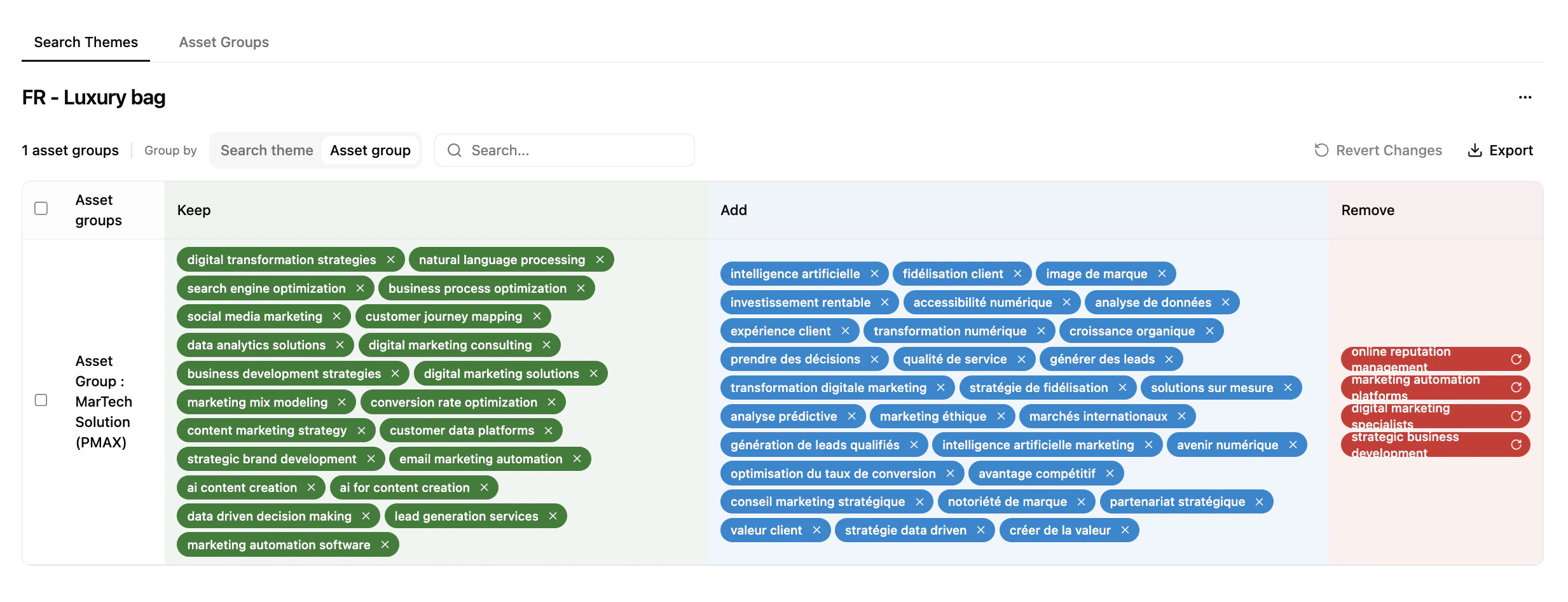
* **Dual perspective** — toggle between a Search Themes view (which groups a theme impacts) and an Asset Groups view (thematic coverage per group).
* **Smart harmonisation** — instantly spot if the same theme is used across too many groups, avoiding internal competition.
* **Bulk management** — keep, add, or remove themes across the inventory from one interface.
* **Inventory tracking** — monitor Search Theme volume in real time (for example 3/25) to stay within Google's limits.
* **Ad-strength visualisation** — Poor / Average / Good scores identify assets that need a refresh.
* **Live status flags** — manage Enabled / Paused statuses and campaign names within the optimisation workflow.
* **Relevancy score** — Strong / Average / Weak, based on historical performance and Asset Group semantics.
* **Logic summaries** — a "Why" block per recommendation explaining the optimisation logic.
* **Incremental learning** — the system prioritises thematic patterns that historically drive the highest performance for your account.
## Why it works
The PMax Optimizer is differentiated not just by the data it uses, but by treating Search Themes as **semantic concepts** rather than keyword strings.
Treats Search Themes as full semantic concepts spanning text, visuals, and brand perception — capturing the true shape of consumer intent.
Prioritises intent clarity and query resonance to accelerate Google's learning phase, reaching higher-value users sooner.
Aligns campaigns with the language real users employ when influenced by AI — driving higher-quality impressions and more relevant traffic.
Ensures consistency from search intent through to the ad and landing page, improving conversion rate and Quality Score.
### How it compares
| Manual / traditional approach | Share Of Model PMax Optimizer |
| ----------------------------------------------------- | ------------------------------------------------------------------------------------- |
| Text-only keyword lists derived from past search data | Multimodal input: text descriptions, visual assets, and LLM-derived brand perception |
| Static keyword suggestions updated infrequently | Semantic concepts tailored to live intent signals, refreshed each analysis cycle |
| Manual filtering based on volume and gut instinct | AI-powered validation using embeddings, volume thresholds, and similarity scoring |
| Keyword strategy disconnected from brand positioning | Themes grounded in how AI models actually describe and recommend the brand |
| Focus on volume only — no strategic diversity check | Balances search volume, semantic uniqueness, and strategic relevance |
| No explanation for why a keyword was suggested | Each recommendation includes a plain-language rationale for full analyst transparency |
## Your connection, data, and controls
Connecting a Google Ads account is a natural point of client concern, so this section sets out plainly how connections behave, what the integration accesses and uses, and what control you retain.
Each workspace gets a single Google Ads connection, but different workspaces in the same organization can each have their own.
Connecting Google Ads requires at least **Editor** role at either the organization or the workspace level.
Connections exist independently in the system. Downgrading or removing someone's permissions doesn't touch the connection.
When a Google Ads account is connected, the underlying **OAuth 2.0** integration technically provides access to the data available within that account. This is a function of how the connection mechanism works — not a reflection of what the platform actually reads or uses.
In practice, Share Of Model — and not any individual analyst — reads only the **connected Asset Groups**: their Search Themes and creative content (headlines, descriptions, and image asset URLs), together with the account's negative keywords and Keyword Planner search-volume data, plus a small amount of enrichment metadata (Asset Group name, parent campaign name, ad-strength score, and Enabled/Paused status) needed to run and display the workflow.
This data is used **exclusively** to perform semantic comparisons against the strengths and weaknesses identified in Share Of Model analyses, and to generate optimisation insights.
No sensitive performance data — spend, impressions, clicks, conversions, or other account metrics — is collected or stored on the Share Of Model platform.
Share Of Model holds **read and write** access solely to the Search Themes associated with the connected Asset Groups. This access is restricted to the connected Asset Groups and is used exclusively to support the analysis and optimisation processes described above.
You retain full control over the connection at all times and can manage, modify, or revoke it whenever you choose. Combined with the fact that no sensitive account metrics are stored, this ensures your data remains under your control throughout the engagement.
* **Credentials** — the OAuth authorization is **encrypted at rest** and is never displayed in the interface.
* **Optimization results** — the Search Themes and recommendations generated for your campaigns, with relevancy scores and rationale, are stored to power the workflow. Account, campaign, and Asset Group data pulled from Google Ads is used to build recommendations and is not kept as a standalone copy beyond the optimization it feeds.
* **Retention** — connection and optimization data follows the retention policy of the workspace or organization it belongs to. Schedules are configurable and aligned contractually with each client's requirements, with removal of connections, credentials, and associated data on workspace or organization deletion and at contract termination. Disconnecting an account removes its connection and credentials.
For platform-wide details on how data is handled — including with model providers — see [Data collection and compliance](/platform/getting-started/understanding-data-collection-and-compliance-in-share-of-model-platform) and [Security and compliance](/platform/getting-started/understanding-security-and-compliance-in-share-of-model-platform).
## Roadmap
Beyond Search Themes, the system will recommend Google Audience Signals — matching each Asset Group with the most relevant personas derived from Share Of Model, refreshed dynamically as analysis cycles update.
A validated agent-based architecture will extract inputs from Google Ads, generate themes from perception and persona data, and score each suggestion — opening the path to continuous, LLM-powered campaign optimisation.
## What's next
Activate Share Of Model insights on TikTok.
LLM-powered audience segments for paid campaigns.
## Controls and visibility
### Promotion Type Selector
Three-axis intent control lets you set guardrails at the Asset Group level to keep PMax aligned with business goals.
**Focus** — direct sales and high-conversion actions.
**Strategy** — locks the model onto transactional keywords, ensuring budget is spent on users ready to purchase rather than information seekers.
**Focus** — lead generation, consultations, professional guidance.
**Strategy** — prioritises high-touch intent for users seeking expertise and professional solutions.
**Focus** — authority, trust, market awareness.
**Strategy** — captures broad, top-of-funnel keywords to build a pipeline of future customers without forcing a hard sell.
Align bidding with intent — spend aggressively on **Product** for immediate ROI, while using **Brand** to capture high-volume, cost-effective awareness.
### Management and monitoring
* **Dual perspective** — toggle between a Search Themes view (which groups a theme impacts) and an Asset Groups view (thematic coverage per group).
* **Smart harmonisation** — instantly spot if the same theme is used across too many groups, avoiding internal competition.
* **Bulk management** — keep, add, or remove themes across the inventory from one interface.
* **Inventory tracking** — monitor Search Theme volume in real time (for example 3/25) to stay within Google's limits.
* **Ad-strength visualisation** — Poor / Average / Good scores identify assets that need a refresh.
* **Live status flags** — manage Enabled / Paused statuses and campaign names within the optimisation workflow.
* **Relevancy score** — Strong / Average / Weak, based on historical performance and Asset Group semantics.
* **Logic summaries** — a "Why" block per recommendation explaining the optimisation logic.
* **Incremental learning** — the system prioritises thematic patterns that historically drive the highest performance for your account.
## Why it works
The PMax Optimizer is differentiated not just by the data it uses, but by treating Search Themes as **semantic concepts** rather than keyword strings.
Treats Search Themes as full semantic concepts spanning text, visuals, and brand perception — capturing the true shape of consumer intent.
Prioritises intent clarity and query resonance to accelerate Google's learning phase, reaching higher-value users sooner.
Aligns campaigns with the language real users employ when influenced by AI — driving higher-quality impressions and more relevant traffic.
Ensures consistency from search intent through to the ad and landing page, improving conversion rate and Quality Score.
### How it compares
| Manual / traditional approach | Share Of Model PMax Optimizer |
| ----------------------------------------------------- | ------------------------------------------------------------------------------------- |
| Text-only keyword lists derived from past search data | Multimodal input: text descriptions, visual assets, and LLM-derived brand perception |
| Static keyword suggestions updated infrequently | Semantic concepts tailored to live intent signals, refreshed each analysis cycle |
| Manual filtering based on volume and gut instinct | AI-powered validation using embeddings, volume thresholds, and similarity scoring |
| Keyword strategy disconnected from brand positioning | Themes grounded in how AI models actually describe and recommend the brand |
| Focus on volume only — no strategic diversity check | Balances search volume, semantic uniqueness, and strategic relevance |
| No explanation for why a keyword was suggested | Each recommendation includes a plain-language rationale for full analyst transparency |
## Your connection, data, and controls
Connecting a Google Ads account is a natural point of client concern, so this section sets out plainly how connections behave, what the integration accesses and uses, and what control you retain.
Each workspace gets a single Google Ads connection, but different workspaces in the same organization can each have their own.
Connecting Google Ads requires at least **Editor** role at either the organization or the workspace level.
Connections exist independently in the system. Downgrading or removing someone's permissions doesn't touch the connection.
When a Google Ads account is connected, the underlying **OAuth 2.0** integration technically provides access to the data available within that account. This is a function of how the connection mechanism works — not a reflection of what the platform actually reads or uses.
In practice, Share Of Model — and not any individual analyst — reads only the **connected Asset Groups**: their Search Themes and creative content (headlines, descriptions, and image asset URLs), together with the account's negative keywords and Keyword Planner search-volume data, plus a small amount of enrichment metadata (Asset Group name, parent campaign name, ad-strength score, and Enabled/Paused status) needed to run and display the workflow.
This data is used **exclusively** to perform semantic comparisons against the strengths and weaknesses identified in Share Of Model analyses, and to generate optimisation insights.
No sensitive performance data — spend, impressions, clicks, conversions, or other account metrics — is collected or stored on the Share Of Model platform.
Share Of Model holds **read and write** access solely to the Search Themes associated with the connected Asset Groups. This access is restricted to the connected Asset Groups and is used exclusively to support the analysis and optimisation processes described above.
You retain full control over the connection at all times and can manage, modify, or revoke it whenever you choose. Combined with the fact that no sensitive account metrics are stored, this ensures your data remains under your control throughout the engagement.
* **Credentials** — the OAuth authorization is **encrypted at rest** and is never displayed in the interface.
* **Optimization results** — the Search Themes and recommendations generated for your campaigns, with relevancy scores and rationale, are stored to power the workflow. Account, campaign, and Asset Group data pulled from Google Ads is used to build recommendations and is not kept as a standalone copy beyond the optimization it feeds.
* **Retention** — connection and optimization data follows the retention policy of the workspace or organization it belongs to. Schedules are configurable and aligned contractually with each client's requirements, with removal of connections, credentials, and associated data on workspace or organization deletion and at contract termination. Disconnecting an account removes its connection and credentials.
For platform-wide details on how data is handled — including with model providers — see [Data collection and compliance](/platform/getting-started/understanding-data-collection-and-compliance-in-share-of-model-platform) and [Security and compliance](/platform/getting-started/understanding-security-and-compliance-in-share-of-model-platform).
## Roadmap
Beyond Search Themes, the system will recommend Google Audience Signals — matching each Asset Group with the most relevant personas derived from Share Of Model, refreshed dynamically as analysis cycles update.
A validated agent-based architecture will extract inputs from Google Ads, generate themes from perception and persona data, and score each suggestion — opening the path to continuous, LLM-powered campaign optimisation.
## What's next
Activate Share Of Model insights on TikTok.
LLM-powered audience segments for paid campaigns.