> ## Documentation Index
> Fetch the complete documentation index at: https://docs.shareofmodel.ai/llms.txt
> Use this file to discover all available pages before exploring further.
# GEO Audit
> Assess your website's readiness for AI-generated answers through 4 complementary scores.
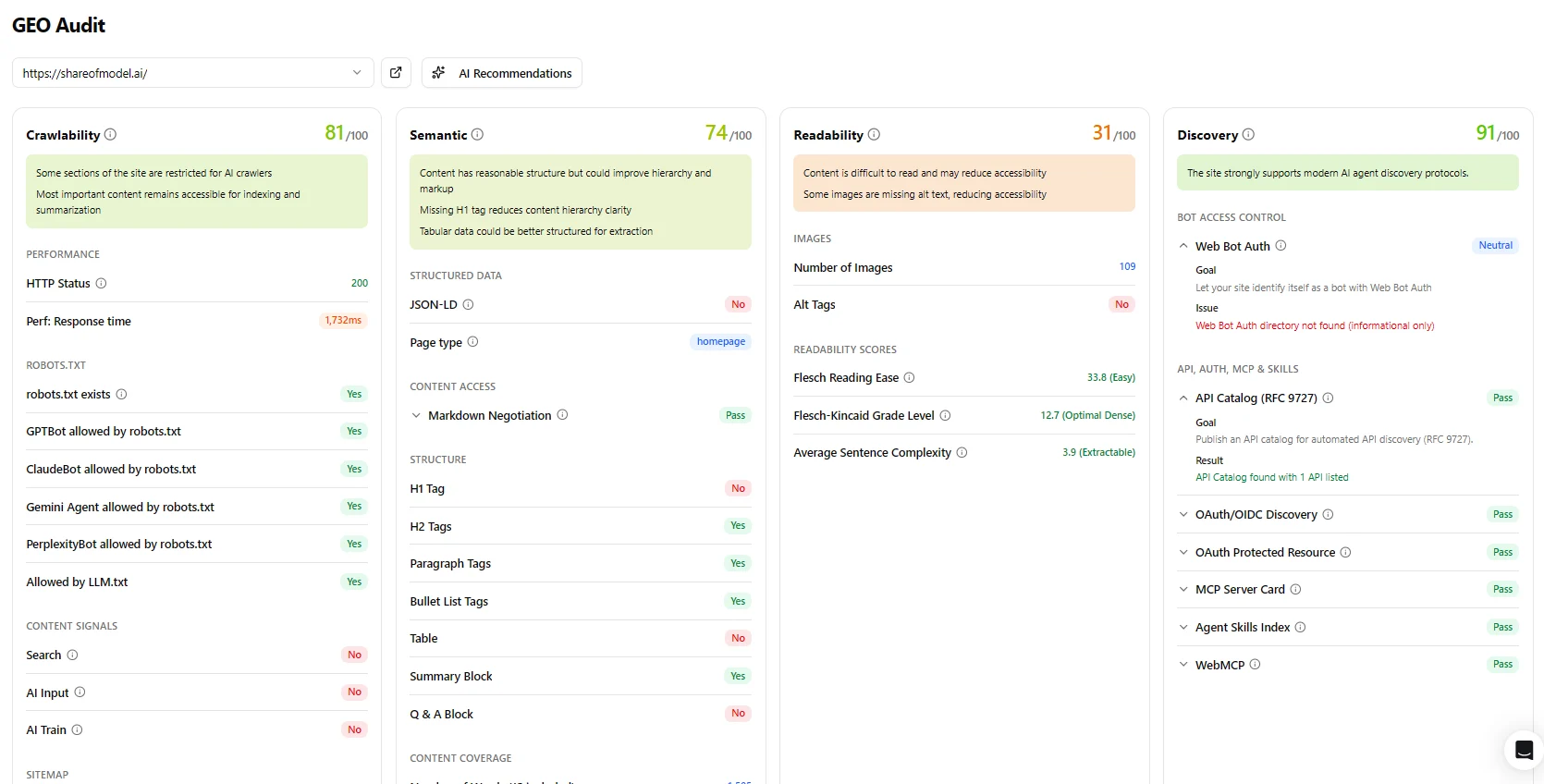
The **GEO Audit** evaluates each URL across four independent dimensions:
* whether AI agents can reach the page,
* whether they can parse its structure,
* whether the content itself is easy to process,
* and whether the page exposes the integration signals modern AI agents look for.
Each dimension produces a score from `0` to `100`. Run the audit on a set of URLs, then filter by score to identify the pages that need attention first.
In the platform sidebar this feature is listed under **Audits** as **AI Readiness Audit**; the page itself is titled GEO Audit. Both names refer to the same thing.
 ## The four scores
Whether AI agents are allowed to reach the page.
Whether they can parse its structure.
Whether the content is easy to process and summarise.
Whether the page exposes the integration signals agents look for.
### Crawlability
Measures whether AI agents are technically allowed to access the page.
The audit checks `robots.txt` for each major AI crawler (GPTBot, ClaudeBot, Gemini Agent, PerplexityBot and others), verifies your `llm.txt` configuration, validates your sitemap, and checks for Link headers and Content Signals. It also records page response time, since slow responses can cause crawlers to time out. AI bot rules support wildcard handling — a single restrictive rule can block multiple agents at once.
A low score means some or all AI agents may be blocked from reading the page entirely — regardless of how well-structured the content is.
| Score | What it means |
| ------ | --------------------------------------------------------------------------- |
| 85–100 | All major AI agents can access the page. |
| 60–84 | Some agents are restricted or the page is slow to respond. |
| 0–59 | Significant access issues — content likely invisible to multiple AI agents. |
### Semantic
Measures how well the page is structured for AI parsing.
AI systems don't read pages the way humans do. They rely on HTML structure — headings, paragraphs, lists, tables — to understand what a page is about and how to extract information. A page that looks well-designed in a browser may have very little structure in its underlying HTML.
The Semantic score evaluates the presence and quality of these structural elements, adjusted for the type of page being audited. A product page is expected to have a clear title and feature lists; a `FAQ` page is expected to have a Q\&A structure. The score reflects whether the page meets those expectations.
The audit also checks **Markdown negotiation** — whether the server can return content in Markdown format when an AI agent requests it via the Accept header. Markdown is increasingly preferred by AI agents for cleaner text extraction.
It also checks for **[Schema.org](https://schema.org) JSON-LD structured data**. Richer schema types (`FAQPage`, `Product`, `HowTo`, `Article`) are strong signals; generic types (`WebPage`, `WebSite`) are weak signals; no schema is a fail.
The detected page type is shown as a badge next to the score. If the detection is incorrect, you can override it manually.
| Score | What it means |
| ------ | ---------------------------------------------------------------------------- |
| 85–100 | Well-structured — AI agents can parse and extract content reliably. |
| 65–84 | Acceptable structure — some improvements available. |
| 40–64 | Structural gaps that may reduce how accurately AI agents interpret the page. |
| 0–39 | Poor structure — content may be misread or ignored. |
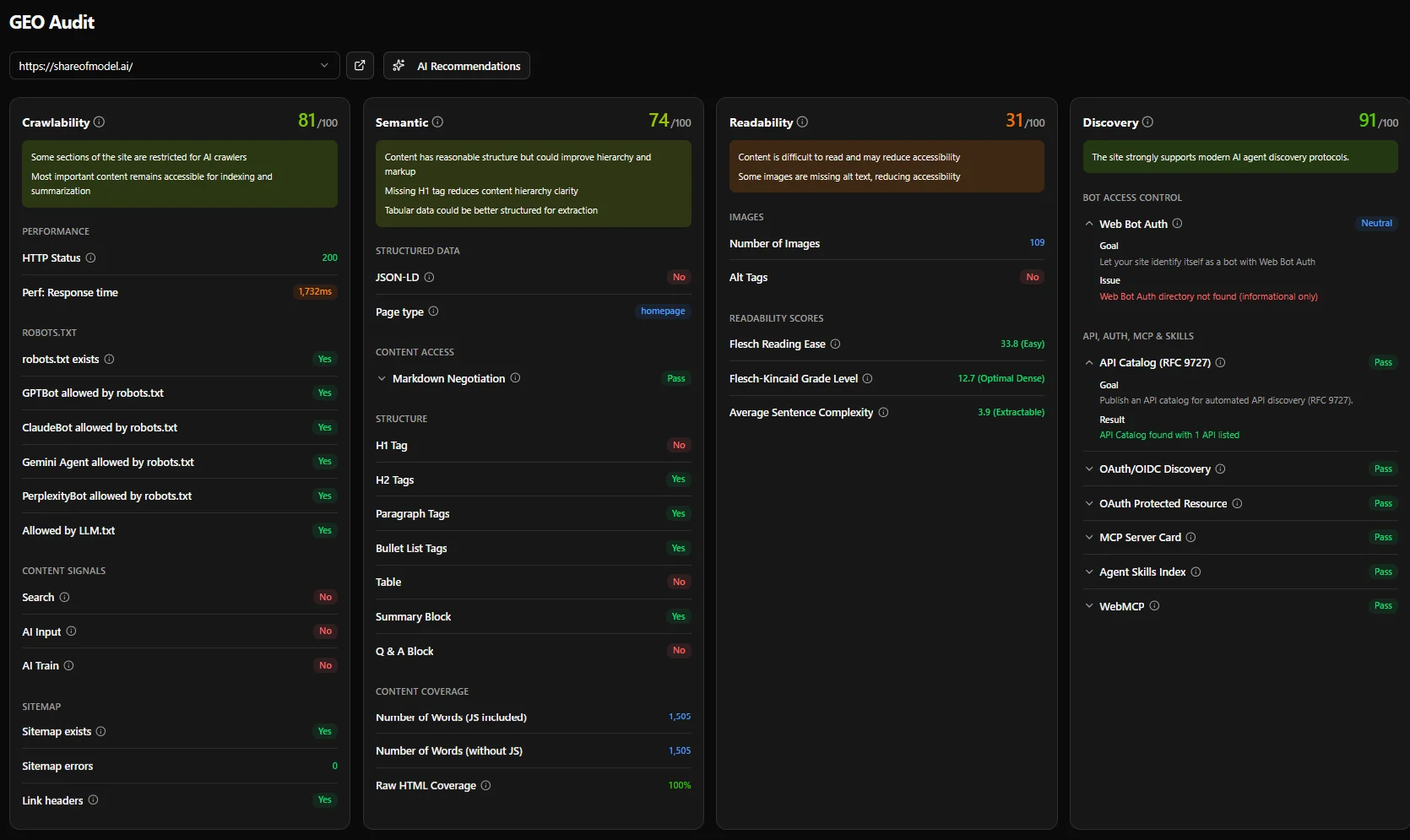
#### **Content Coverage**
At the bottom of the Semantic score panel, three metrics are shown:
* **Number of Words (JS included)** — total word count of the page as rendered with full JavaScript.
* **Number of Words (without JS)** — word count visible to AI crawlers without JavaScript. Compare this to the JS figure to gauge how much content is hidden behind client-side rendering.
* **Raw HTML Coverage** — the percentage of raw HTML content that is also visible to AI crawlers. A score of 100% means all content in the raw HTML is accessible without JavaScript — *not* that 100% of the full page is AI-visible. Content loaded exclusively via JavaScript falls outside this comparison entirely.
A large gap between the two word counts, or a low Raw HTML Coverage score, is a strong signal that your page relies heavily on client-side rendering, which directly reduces AI citability.
### Readability
Measures whether the content is easy for an AI system to process and summarise.
The score looks at the language itself: sentence length, vocabulary complexity, reading grade level, and sentence structure. It also checks whether images have descriptive alt text — AI agents cannot interpret images without it.
Content that is dense, highly technical, or relies on complex sentence constructions may be hard to summarise or cite, even if it is perfectly accessible and well-structured.
| Score | What it means |
| ------ | --------------------------------------------------------------------------------- |
| 65–100 | Clear, accessible content — easy for both AI and humans to process and summarise. |
| 40–64 | Acceptable — some complexity may reduce summarisation accuracy. |
| 0–39 | Dense or complex content — AI agents may struggle to extract key information. |
### Discovery
Measures whether the page or domain exposes the integration signals that AI agents and agentic frameworks look for.
This score goes beyond content accessibility. It checks whether your site publishes the machine-readable endpoints, authentication protocols, and agent capability declarations that allow AI systems to interact with it programmatically — not just read it.
Discovery data is sourced from [**Is It Agent Ready?**](https://isitagentready.com/), a free tool by Cloudflare that scans your site against multiple emerging agentic standards to measure AI agent readiness.
The audit checks two groups of signals:
**Bot Access Control**
* Web Bot Auth signing — whether the domain supports authenticated bot access using the Web Bot Auth protocol
**API, Auth, MCP & Skills**
* API catalog (RFC 9727)
* OAuth/OIDC discovery
* OAuth Protected Resource metadata
* MCP Server Card
* Agent Skills index
* WebMCP
Each check returns pass, fail, or neutral. Neutral checks (where the standard is not applicable to the page type) contribute a partial score rather than counting as failures.
| Score | What it means |
| :----- | :------------------------------------------------------------------------------------- |
| 75–100 | Strong agent integration signals — the site is well-prepared for agentic use. |
| 40–64 | Partial readiness — some integration protocols are missing. |
| 0–39 | Limited agent integration — the site is not yet discoverable by most agent frameworks. |
## AI Recommendations
Each audit includes an AI Recommendations panel that synthesises the four scores into a plain-English summary and a prioritised action list.
The summary tells you how the page performs overall and where the most impactful opportunity lies. The recommendations below it are specific and ordered by impact — so if you can only fix one thing, you fix the right one first.
## Reading the results
Each URL shows all four scores side by side. You can sort and filter by any score to prioritise fixes. The panel below each score lists the specific issues found and what to do about them — most actionable first.
A page can score well on Crawlability but poorly on Semantic, Readability or Discovery. All four matter for AI citation: the agent needs to be able to reach the page, understand its structure, and process its content, and ideally interact with your site through standard protocols.
## Common patterns
The page is accessible but poorly structured. Common on pages built with heavy client-side rendering, where visible content is generated by JavaScript and absent from the raw HTML. Improving server-side rendering or adding structured HTML markup typically resolves this.
The page has good structure but the content is difficult to process — common on legal, medical or highly technical pages. Add a plain-language summary or break long sentences into shorter ones.
Usually caused by an overly restrictive `robots.txt` that blocks AI crawlers as a group. Review your bot access policy and explicitly permit the agents you want to allow.
## The four scores
Whether AI agents are allowed to reach the page.
Whether they can parse its structure.
Whether the content is easy to process and summarise.
Whether the page exposes the integration signals agents look for.
### Crawlability
Measures whether AI agents are technically allowed to access the page.
The audit checks `robots.txt` for each major AI crawler (GPTBot, ClaudeBot, Gemini Agent, PerplexityBot and others), verifies your `llm.txt` configuration, validates your sitemap, and checks for Link headers and Content Signals. It also records page response time, since slow responses can cause crawlers to time out. AI bot rules support wildcard handling — a single restrictive rule can block multiple agents at once.
A low score means some or all AI agents may be blocked from reading the page entirely — regardless of how well-structured the content is.
| Score | What it means |
| ------ | --------------------------------------------------------------------------- |
| 85–100 | All major AI agents can access the page. |
| 60–84 | Some agents are restricted or the page is slow to respond. |
| 0–59 | Significant access issues — content likely invisible to multiple AI agents. |
### Semantic
Measures how well the page is structured for AI parsing.
AI systems don't read pages the way humans do. They rely on HTML structure — headings, paragraphs, lists, tables — to understand what a page is about and how to extract information. A page that looks well-designed in a browser may have very little structure in its underlying HTML.
The Semantic score evaluates the presence and quality of these structural elements, adjusted for the type of page being audited. A product page is expected to have a clear title and feature lists; a `FAQ` page is expected to have a Q\&A structure. The score reflects whether the page meets those expectations.
The audit also checks **Markdown negotiation** — whether the server can return content in Markdown format when an AI agent requests it via the Accept header. Markdown is increasingly preferred by AI agents for cleaner text extraction.
It also checks for **[Schema.org](https://schema.org) JSON-LD structured data**. Richer schema types (`FAQPage`, `Product`, `HowTo`, `Article`) are strong signals; generic types (`WebPage`, `WebSite`) are weak signals; no schema is a fail.
The detected page type is shown as a badge next to the score. If the detection is incorrect, you can override it manually.
| Score | What it means |
| ------ | ---------------------------------------------------------------------------- |
| 85–100 | Well-structured — AI agents can parse and extract content reliably. |
| 65–84 | Acceptable structure — some improvements available. |
| 40–64 | Structural gaps that may reduce how accurately AI agents interpret the page. |
| 0–39 | Poor structure — content may be misread or ignored. |
#### **Content Coverage**
At the bottom of the Semantic score panel, three metrics are shown:
* **Number of Words (JS included)** — total word count of the page as rendered with full JavaScript.
* **Number of Words (without JS)** — word count visible to AI crawlers without JavaScript. Compare this to the JS figure to gauge how much content is hidden behind client-side rendering.
* **Raw HTML Coverage** — the percentage of raw HTML content that is also visible to AI crawlers. A score of 100% means all content in the raw HTML is accessible without JavaScript — *not* that 100% of the full page is AI-visible. Content loaded exclusively via JavaScript falls outside this comparison entirely.
A large gap between the two word counts, or a low Raw HTML Coverage score, is a strong signal that your page relies heavily on client-side rendering, which directly reduces AI citability.
### Readability
Measures whether the content is easy for an AI system to process and summarise.
The score looks at the language itself: sentence length, vocabulary complexity, reading grade level, and sentence structure. It also checks whether images have descriptive alt text — AI agents cannot interpret images without it.
Content that is dense, highly technical, or relies on complex sentence constructions may be hard to summarise or cite, even if it is perfectly accessible and well-structured.
| Score | What it means |
| ------ | --------------------------------------------------------------------------------- |
| 65–100 | Clear, accessible content — easy for both AI and humans to process and summarise. |
| 40–64 | Acceptable — some complexity may reduce summarisation accuracy. |
| 0–39 | Dense or complex content — AI agents may struggle to extract key information. |
### Discovery
Measures whether the page or domain exposes the integration signals that AI agents and agentic frameworks look for.
This score goes beyond content accessibility. It checks whether your site publishes the machine-readable endpoints, authentication protocols, and agent capability declarations that allow AI systems to interact with it programmatically — not just read it.
Discovery data is sourced from [**Is It Agent Ready?**](https://isitagentready.com/), a free tool by Cloudflare that scans your site against multiple emerging agentic standards to measure AI agent readiness.
The audit checks two groups of signals:
**Bot Access Control**
* Web Bot Auth signing — whether the domain supports authenticated bot access using the Web Bot Auth protocol
**API, Auth, MCP & Skills**
* API catalog (RFC 9727)
* OAuth/OIDC discovery
* OAuth Protected Resource metadata
* MCP Server Card
* Agent Skills index
* WebMCP
Each check returns pass, fail, or neutral. Neutral checks (where the standard is not applicable to the page type) contribute a partial score rather than counting as failures.
| Score | What it means |
| :----- | :------------------------------------------------------------------------------------- |
| 75–100 | Strong agent integration signals — the site is well-prepared for agentic use. |
| 40–64 | Partial readiness — some integration protocols are missing. |
| 0–39 | Limited agent integration — the site is not yet discoverable by most agent frameworks. |
## AI Recommendations
Each audit includes an AI Recommendations panel that synthesises the four scores into a plain-English summary and a prioritised action list.
The summary tells you how the page performs overall and where the most impactful opportunity lies. The recommendations below it are specific and ordered by impact — so if you can only fix one thing, you fix the right one first.
## Reading the results
Each URL shows all four scores side by side. You can sort and filter by any score to prioritise fixes. The panel below each score lists the specific issues found and what to do about them — most actionable first.
A page can score well on Crawlability but poorly on Semantic, Readability or Discovery. All four matter for AI citation: the agent needs to be able to reach the page, understand its structure, and process its content, and ideally interact with your site through standard protocols.
## Common patterns
The page is accessible but poorly structured. Common on pages built with heavy client-side rendering, where visible content is generated by JavaScript and absent from the raw HTML. Improving server-side rendering or adding structured HTML markup typically resolves this.
The page has good structure but the content is difficult to process — common on legal, medical or highly technical pages. Add a plain-language summary or break long sentences into shorter ones.
Usually caused by an overly restrictive `robots.txt` that blocks AI crawlers as a group. Review your bot access policy and explicitly permit the agents you want to allow.
Note that wildcard rules can unintentionally block multiple crawlers at once.
If the block is at the network level rather than in `robots.txt` — an error or a score of `0` on every URL — see [Access, firewalls and whitelisting](#access-firewalls-and-whitelisting).
The site has not yet published agent integration standards. Start with the MCP Server Card and OAuth/OIDC discovery endpoints — these unlock the highest point value in the Discovery scoring matrix.
## Access, firewalls and whitelisting
Two parts of the audit reach your site with automated requests: the [**Discovery**](#discovery) score, which probes your agent-integration endpoints, and the **AI View** screenshot capture. If your firewall, CDN or bot-management layer blocks that traffic before it reaches the page, Discovery shows **N/A** (or a score of `0`) and the AI View screenshot fails.
A common reaction is to ask your security team to whitelist the audit — by IP address or by user-agent. **Neither approach solves the problem the score is measuring, and both distort the results.**
### Why IP whitelisting doesn't help
Whitelisting the audit's IP addresses only proves that you have opened a door for **one specific source**. **It does not prove your site is reachable by AI models in general** — GPTBot, ClaudeBot, PerplexityBot, Gemini Agent and the rest each connect from their own, frequently changing IP ranges under their own user agents, none of which are covered by an exception made for the audit.
**Whitelisting the audit also invalidates the results.** "Agent-ready" means your site accepts AI bots **as a matter of policy** — not through a hardcoded exception for a single scanner. A green score obtained this way gives you **false confidence while real AI agents remain blocked**.
### Why user-agent whitelisting isn't a security measure
**Authorising bots by user-agent is not a security control.** User-agent strings are **trivial to spoof**: any client can claim to be ClaudeBot, GPTBot, the audit, or anything else. Allowing traffic on that basis creates a **false sense of security** while letting any actor impersonate the identity you whitelisted — and it still tells you nothing about whether AI agents can reach your site by policy.
**It also won't unblock the full audit anyway.** The audit probes your site from several angles — checking different standards and endpoints, and testing how your site responds to the crawlers AI models actually use. Whitelisting one user-agent won't let all of those checks through, so **your scores will stay incomplete** even after the exception is in place.
### What to do instead
The real question is **a policy decision for your team**: do you want to broadly allow AI access, or maintain your current blocking posture deliberately? Broadly allowing AI access requires different firewall and bot-management rules — **permitting AI crawlers as a class** — rather than per-source exceptions.
**Broad authorisation is the only approach that reliably works today.** Most AI agents don't announce themselves as AI, and **neither user-agent nor IP can prove a request comes from a genuine AI model** — both are trivially forged. The one mechanism that does provide verifiable bot identity is cryptographic signing (**Web Bot Auth**), which the [Discovery](#discovery) score already checks — but adoption is still emerging, so gating access on it today would block most legitimate agents. Until signed-bot support is widespread, any allow rule that depends on proving a caller's identity will either block real agents or be trivially bypassed. **If you want AI models to reach your content, allow the traffic broadly** rather than trying to admit "only real AI".
### If you whitelist anyway
Whitelisting is a temporary testing measure — pair it with a broad bot-access policy, not an IP exception, and don't mistake it for your actual agent-access policy. If you still want to whitelist each part of the audit, allow the following.
#### Discovery score
Allow this user agent:
```text theme={null}
Mozilla/5.0 (compatible; AgentReadinessScanner/1.0; +https://isitagentready.com)
```
#### AI View screenshot capture
Allow this user agent:
```text theme={null}
Mozilla/5.0 AppleWebKit/537.36 (KHTML, like Gecko; compatible; Claude-User/1.0; +Claude-User@anthropic.com)
```
…and requests from the following IP addresses, grouped by region.
```text theme={null}
24.199.114.24
137.184.176.158
159.223.195.29
137.184.227.6
209.38.71.144
137.184.112.236
209.38.65.140
161.35.226.96
137.184.228.209
143.110.146.71
64.23.239.195
146.190.113.225
147.182.227.235
164.90.146.51
24.199.101.66
137.184.40.234
64.227.110.40
64.23.244.105
164.92.94.8
146.190.142.72
209.38.68.140
134.199.210.236
64.23.239.91
137.184.225.149
164.92.82.210
146.190.165.160
137.184.126.247
64.23.232.158
146.190.49.182
146.190.131.75
146.190.148.104
143.198.69.221
64.227.99.247
64.23.137.10
64.23.134.39
165.232.148.140
137.184.181.162
134.199.218.220
165.232.149.70
159.223.204.80
164.90.154.14
24.199.105.87
137.184.179.169
143.110.155.247
64.23.208.16
137.184.91.182
143.198.108.64
146.190.166.241
143.244.184.17
137.184.5.231
209.38.77.68
164.90.148.206
165.232.157.112
146.190.122.117
64.23.248.66
24.199.122.155
209.38.154.8
143.198.79.6
143.110.229.184
143.110.149.156
64.227.102.147
159.223.203.65
146.190.162.178
164.92.88.113
164.90.148.35
147.182.242.112
64.23.181.211
143.110.145.225
143.198.107.204
146.190.134.224
143.198.73.138
159.223.201.225
143.198.128.141
143.198.237.241
143.110.237.153
64.23.171.249
143.198.50.127
143.198.101.8
137.184.238.116
146.190.159.225
165.232.132.180
164.90.146.185
161.35.225.36
134.199.230.251
137.184.8.144
24.199.115.101
64.23.250.32
161.35.228.51
137.184.5.46
64.23.251.118
161.35.230.245
164.92.75.107
164.92.98.36
137.184.95.143
64.23.168.154
137.184.7.119
146.190.119.16
209.38.66.139
134.199.231.29
137.184.82.250
159.223.206.203
137.184.190.70
164.92.100.113
146.190.134.48
143.198.77.171
64.23.139.175
143.198.51.161
64.23.152.164
147.182.229.50
144.126.209.91
144.126.210.119
209.38.158.124
143.244.188.230
164.92.86.162
24.199.115.127
164.92.69.158
161.35.237.84
24.144.93.82
209.38.70.0
137.184.116.41
209.38.139.18
24.199.116.181
143.198.139.144
165.232.133.224
64.23.248.39
128.199.15.247
147.182.242.241
137.184.229.229
144.126.218.225
147.182.231.16
146.190.126.130
164.90.157.108
144.126.219.179
64.23.128.241
161.35.231.117
134.199.238.178
64.23.233.215
64.23.236.37
161.35.226.78
161.35.232.6
64.23.237.112
143.244.180.189
137.184.33.68
164.92.104.130
24.199.117.167
137.184.45.185
143.110.229.10
137.184.187.120
134.199.220.112
165.232.135.19
147.182.240.226
146.190.33.186
209.38.79.22
128.199.15.68
147.182.247.213
159.223.197.48
137.184.119.200
143.244.190.131
147.182.251.22
137.184.83.190
147.182.255.73
137.184.225.117
64.23.175.120
147.182.226.137
144.126.216.11
209.38.79.187
209.38.68.13
209.38.74.36
164.92.95.6
209.38.75.204
209.38.67.232
209.38.70.84
209.38.73.120
143.198.129.120
143.198.136.242
146.190.114.39
146.190.118.62
146.190.59.199
146.190.116.90
146.190.34.116
64.23.239.117
64.23.238.239
64.23.235.163
64.23.238.31
64.23.238.124
64.23.232.196
64.23.234.46
164.90.159.169
164.90.155.253
64.23.235.171
64.23.215.208
64.23.167.192
64.23.215.190
137.184.3.181
143.198.109.32
146.190.44.51
161.35.229.21
161.35.229.77
161.35.237.149
161.35.233.103
```
```text theme={null}
167.99.86.159
138.68.178.73
68.183.38.125
159.65.62.115
167.71.136.49
144.126.235.129
138.68.177.152
46.101.79.8
159.65.30.45
157.245.43.223
46.101.5.215
143.110.174.124
165.232.103.162
138.68.174.238
46.101.91.239
143.110.161.95
64.227.46.159
134.122.100.42
138.68.186.36
206.189.25.70
178.62.112.38
134.122.109.237
143.110.171.242
167.71.129.14
178.62.46.246
165.227.231.89
161.35.35.202
104.248.168.184
206.189.19.41
161.35.169.49
165.232.45.179
68.183.37.224
206.189.120.126
167.99.81.24
134.209.28.105
165.232.109.204
104.248.163.117
```
```text theme={null}
188.166.96.225
178.62.226.239
165.22.205.87
134.209.86.202
209.38.105.29
178.62.192.187
64.225.72.116
209.38.45.146
178.62.253.10
164.92.152.84
142.93.228.70
188.166.113.22
167.71.74.91
157.245.70.98
161.35.150.45
157.245.73.238
161.35.82.85
188.166.58.113
178.128.251.228
178.62.207.157
```
## What's next
Score creative assets against brand attributes.
Track domain and brand presence across engines.